Upcoming Maintenance June 1st 2026 at 8PM: Please note that our service will be temporarily interrupted for some maintenance for about 3 hours on June 1st starting at 8PM EDT. During this period, the application will be inaccessible and some statistics may not be compiled. Also, some functionalities may be interrupted and any scheduled emails will be sent once the service is restored.
Close

Customize fields

What are my options?
You can change the visual appearance of a field. Click on the field you’d like to modify, then click the Customize field's style button located in the right sidebar. You can also access these options by selecting the Design tab in the sidebar, then by clicking on the Fields sub-tab.
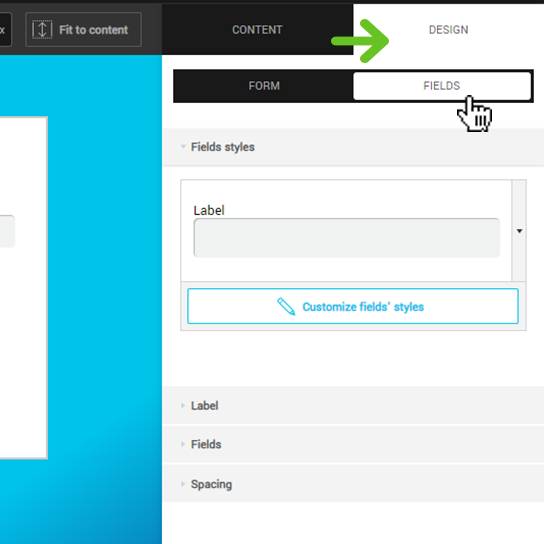
When you modify the appearance of a field, all them will be modified to look the same. It's not possible to change the appearance of a single field.

In the Customize field's style menu, you can click on the preview to access the Style bank. A window will open with different options. Have fun: you can alternate between styles as many times as you want.
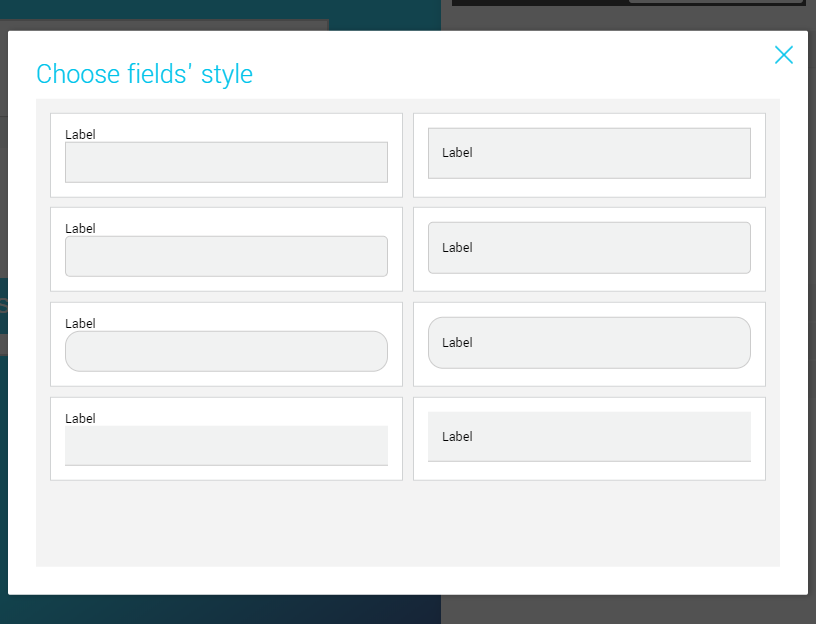
 

Top